 Callmora
Transcription
Every call becomes a transcript before Callmora can write notes about it or answer questions from it. You choose how that transcript gets made — entirely on your Mac, or through AssemblyAI's cloud service with your own key — and you can change your mind whenever you like.
Local or cloud
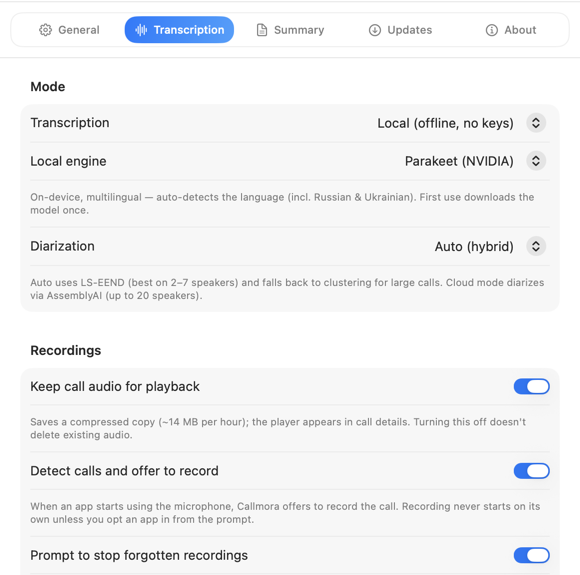
In Settings → Transcription, under Mode, the Transcription picker offers two options:
Local (offline, no keys)
Runs entirely on your Mac's Neural Engine. Nothing about the call — audio or text — leaves the device, and there's no account or API key involved.
Cloud (AssemblyAI)
Sends the call's audio to AssemblyAI using your own API key. Usually the sharper transcript on difficult audio — crosstalk, accents, background noise — at the cost of the recording leaving your Mac.
Switch anytime. The mode you pick applies to the next call you record; a call you've already transcribed keeps the transcript it has.
Local engines: Parakeet and Whisper
Local mode runs on Parakeet (NVIDIA) — no engine choice to make. Whisper remains as an advanced option: hold ⌥ Option in Settings → Transcription to reveal the Local engine picker (and the Model files row). The trade-off:
- Parakeet (NVIDIA) — the default, and the stronger engine on real calls: one multilingual model that auto-detects the spoken language across 25 European languages, including Russian and Ukrainian, in a single pass. There's no size choice, because there's only one model.
- Whisper — slower, and weaker on mixed-language calls in our testing, but it understands ~100 languages where Parakeet covers 25 European ones. If your calls are in a language Parakeet doesn't speak, this is your local path. Three model sizes: Large v3 Turbo — best quality, Small — faster, Tiny — fastest.
Both run on your Mac's Neural Engine. Neither does its own speaker separation — Callmora runs that as a separate step over the recorded audio (see Speakers & voices).
Model downloads
A local model isn't bundled with the app. The first time you use an engine, Callmora downloads it — a one-time fetch that needs an internet connection. After that, transcription with that engine runs fully offline.
While a model downloads, Settings shows a spinner and "Downloading model…"; if the download fails, a Retry button takes its place. Once a model is installed, Model files shows its size and the date it was downloaded — or "Not downloaded yet" — with the folder path underneath. Delete and download again removes the model and fetches a fresh copy, which is worth trying if a model seems to have downloaded badly or transcribes worse on one Mac than another. It's disabled while a recording or transcription is actually running, since the files are in use.
Cloud: AssemblyAI
Cloud mode needs your own AssemblyAI key — Callmora has no server of its own to hold a transcription job for you.
- Create an account at assemblyai.com if you don't already have one.
- Copy your key from assemblyai.com/app/api-keys.
- Paste it into Settings → Transcription → AssemblyAI API key.
The key is stored in your Mac's Keychain, not on any Callmora server — there isn't one. See Security & sync for the full picture of where your data goes in each mode.
Cloud mode also diarizes differently: speakers are separated by AssemblyAI itself, supporting up to 20 speakers on one call, instead of the on-device separation Local mode uses. It additionally reads each moment's mood and tints the call's waveform — green for positive, red for negative. Local mode leaves the waveform plain grey.
Custom vocabulary
Names, products, and jargon that Callmora keeps mishearing can be taught to it directly. Open Settings → Transcription, find the Vocabulary section, and select Custom vocabulary to open the manager: search existing terms, add them one at a time or paste many at once (one per line, or comma-separated), and import or export the whole list as a .txt file.
Vocabulary terms boost recognition in cloud transcription and local Whisper. The local Parakeet engine has no term-boosting hook, so it can't use them. Terms apply going forward, to calls transcribed after you add them — they don't rewrite transcripts you already have. Keep entries short: phrases over six words or 80 characters are dropped, and only the first 200 terms are sent to the transcriber for any one call.
Language detection
There's no manual language picker for transcription. Whisper and Parakeet both auto-detect the spoken language for every call — Whisper with a dedicated detection pass before it transcribes, Parakeet as part of its single multilingual pass. Cloud mode leaves the same decision to AssemblyAI.
This is separate from the Summary language setting, which only controls the language your AI notes are written in — see AI notes & chat.

Model stuck downloading, or a transcription failing outright? See Troubleshooting.